# Get-IntuneManagementExtensionDiagnostics v1.1 #
This script **analyzes** Microsoft Intune Management Extension (IME) log(s) and creates timeline report from found events.
It also includes really capable **-LogViewerUI** for manual Intune log(s) viewing.
Go to script [Get-IntuneManagementExtensionDiagnostics.ps1](./Get-IntuneManagementExtensionDiagnostics.ps1)
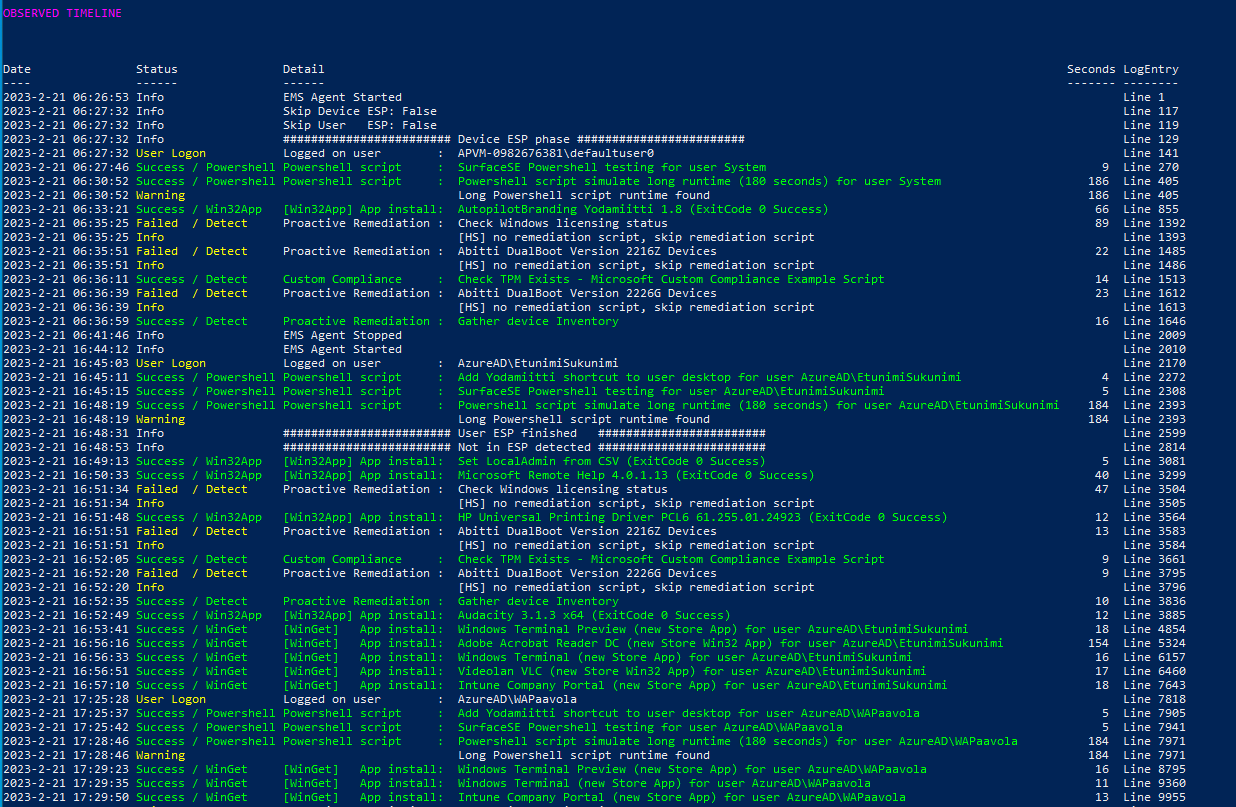
 Timeline report includes information about Intune events
* **Win32App**
* **WinGetApp**
* **Powershell scripts**
* **Proactive Remedation scripts**
* **custom Compliance Policy scripts**
Windows Autopilot ESP phases and other information is also shown on timeline.
### Usage: ###
**Download** script from PowershellGallery with command:
```
Save-Script Get-IntuneManagementExtensionDiagnostics -Path ./
```
**Run script**
```
./Get-IntuneManagementExtensionDiagnostics.ps1
# or to get Intune Powershell script names from Graph API
# use -Online parameter
./Get-IntuneManagementExtensionDiagnostics.ps1 -Online
```
**-Online** parameter will download Powershell script names from Graph API. Win32App and WinGetApp names are detected from Intune log files.
-Online parameter requires Intune Powershell management module **Microsoft.Graph.Intune** installation.
You can install Intune Powershell management module to your user account with command
```
Install-Module -Name Microsoft.Graph.Intune -Scope CurrentUser
```
**In Windows Autopilot Shift-F10 Command Prompt during Windows Autopilot Pre-Provisioning or Enrollment Status Page**
```
Powershell.exe
cd C:\ProgramData
Set-ExecutionPolicy bypass -Scope Process
Save-Script Get-IntuneManagementExtensionDiagnostics -Path ./
./Get-IntuneManagementExtensionDiagnostics.ps1
# -Online when you need to get displayNames to Powershell scripts
./Get-IntuneManagementExtensionDiagnostics.ps1 -Online
```
### Parameters ###
.\Get-IntuneManagementExtensionDiagnostics.ps1 -Online -AllLogEntries -AllLogFiles
**-AllLogEntries** **-AllLogFiles**
Open all supported log files (IntuneManagementExtension and AgentExecutor) and also show all log events
These options prevents showing UI which asks same information
```
.\Get-IntuneManagementExtensionDiagnostics.ps1 -Online -AllLogEntries -AllLogFiles
```
**-LogFile**
Open log file specifying fullpath to logfile
```
./Get-IntuneManagementExtensionDiagnostics.ps1 -LOGFile -LOGFile "C:\temp\MDMDiagReport\IntuneManagementExtension.log"
```
**-LogFilesFolder**
Open log files folder and show UI where you can select what Intune log files to open
```
./Get-IntuneManagementExtensionDiagnostics.ps1 -LogFilesFolder "C:\temp\MDMDiagReport"
```
**-ShowAllTimelineEntries**
Shows start events on Timeline.
```
./Get-IntuneManagementExtensionDiagnostics.ps1 -ShowAllTimelineEntries
```
Intune Powershell scripts' outputs and errors can be also shown in Timeline view with parameters
**-ShowStdOutInTimeline**
**-ShowErrorsInTimeline**
This shows instantly what is problem with failed Powershell scripts
There are many more Parameters but these should get you started.
### LogViewerUI - better than cmtrace.exe ?-) ###
Script also includes really capable Log Viewer UI when script is started with parameter **-ShowLogViewerUI**
```
./Get-IntuneManagementExtensionDiagnostics.ps1 -Online -ShowLogViewerUI -ConvertAllKnownGuidsToClearText
```
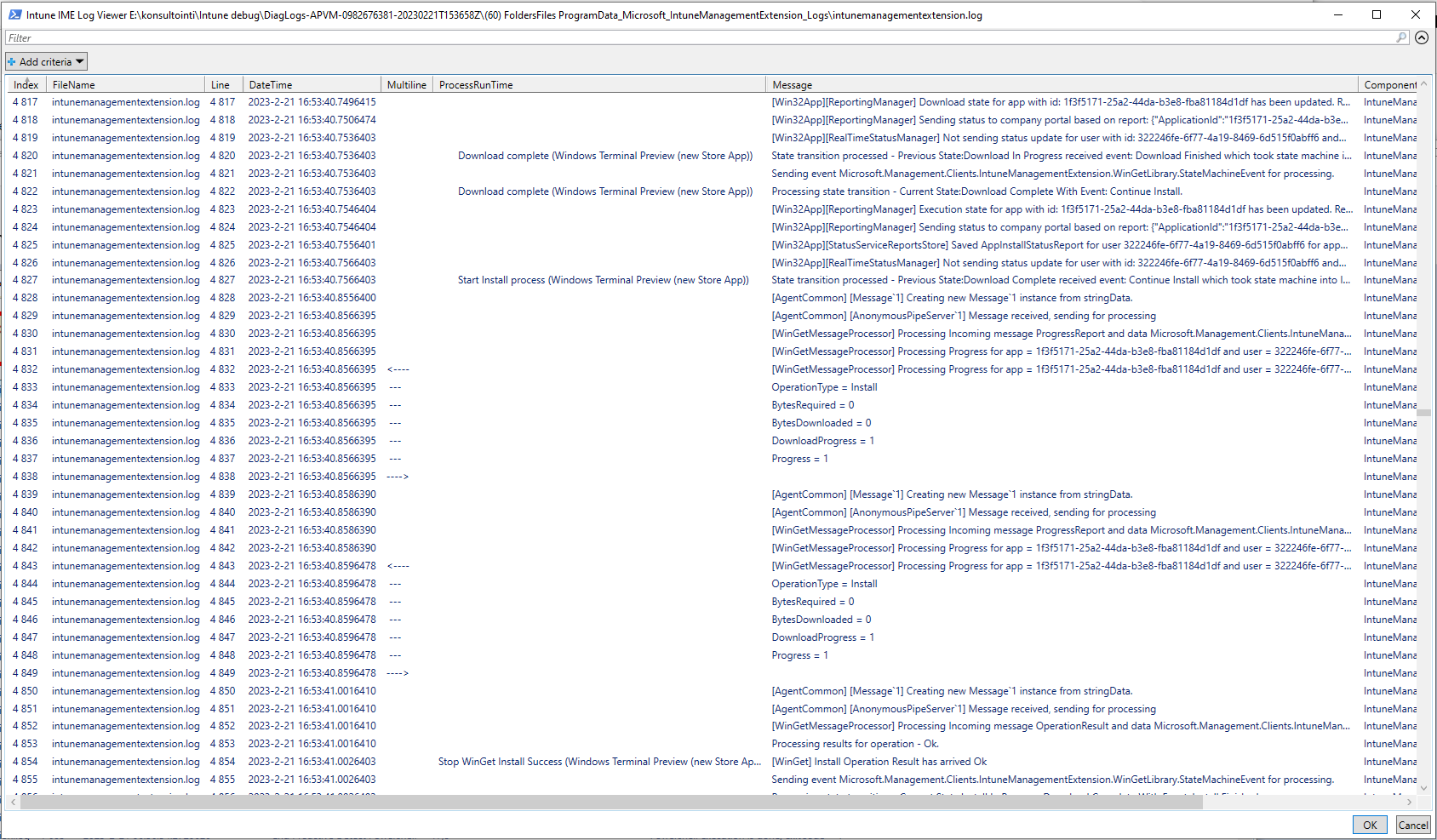
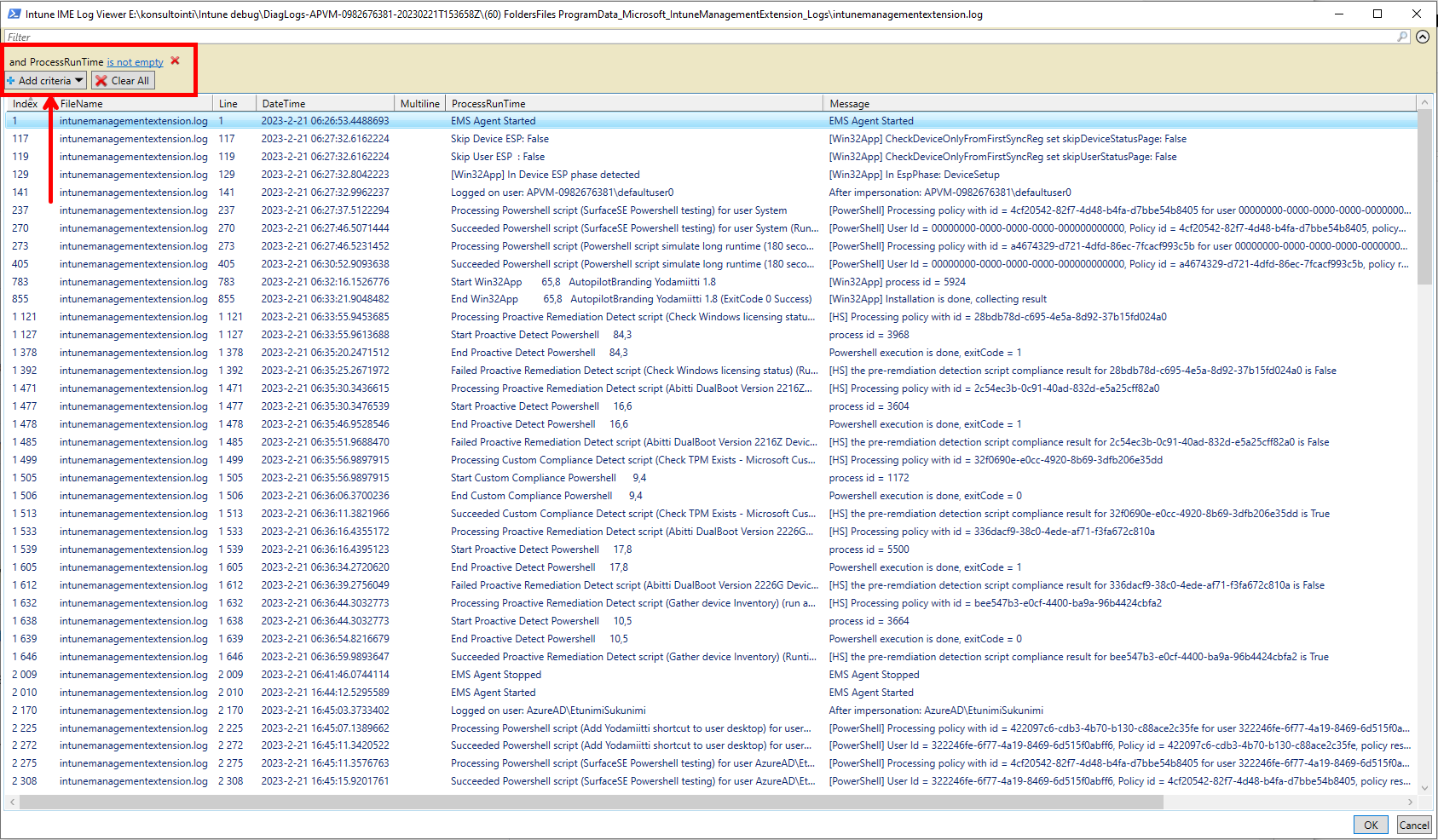
LogViewerUI (Out-GridView) looks a lot like cmtrace.exe tool but it is better because all found Timeline events are added to log for easier debugging.
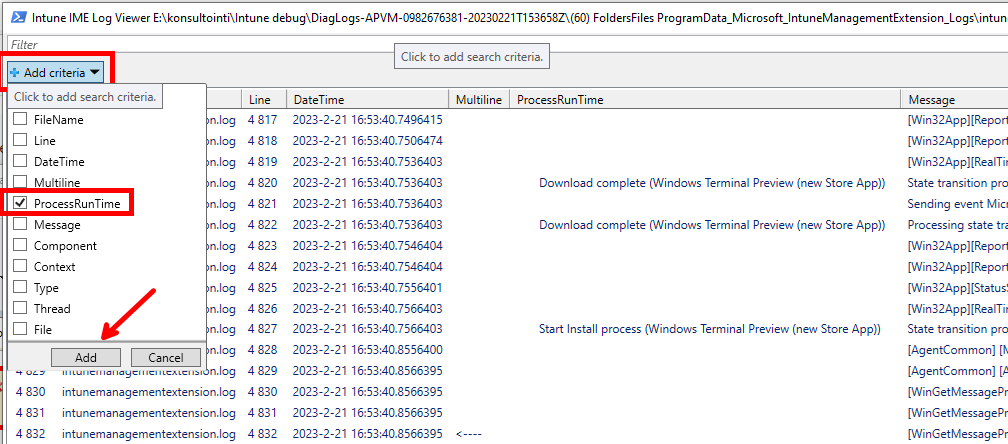
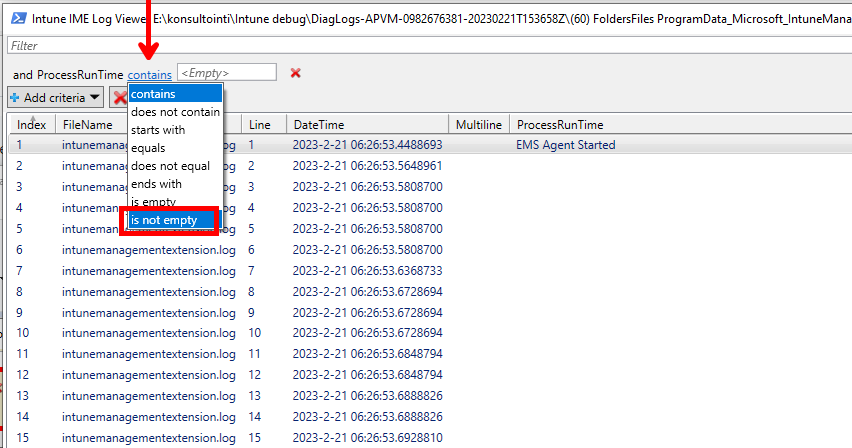
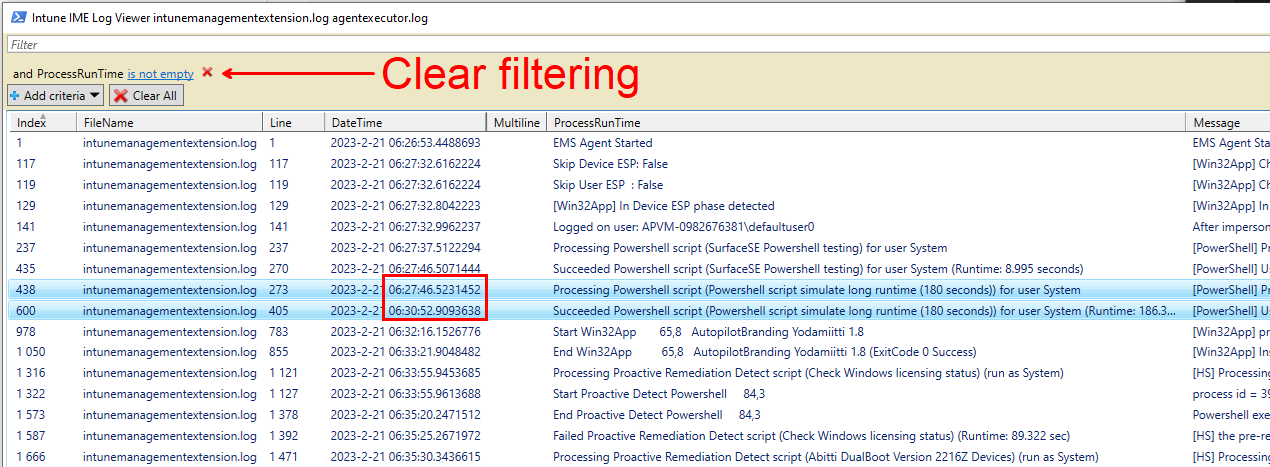
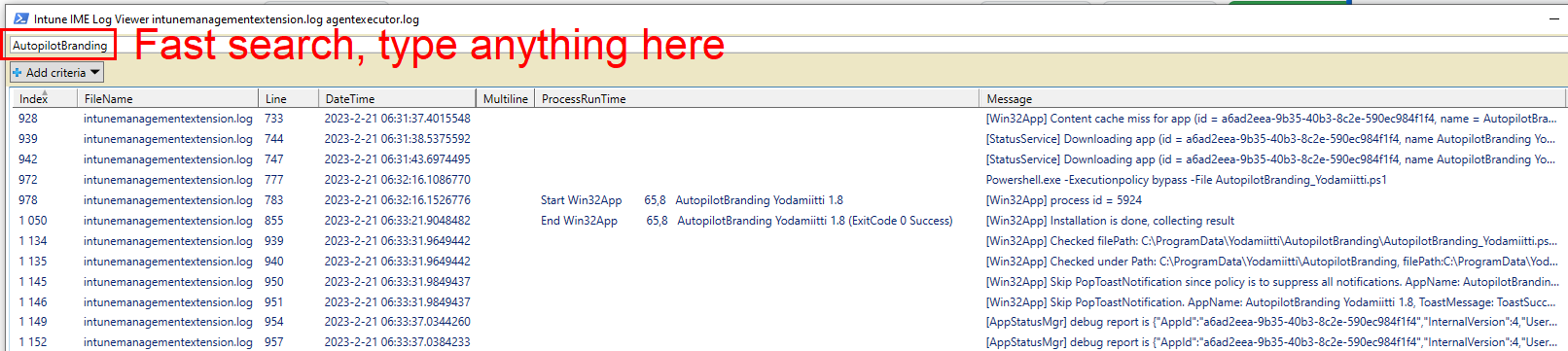
LogViewerUI has good search and filtering capabilities. Try to filter known log entries in Timeline:
**Add criteria -> ProcessRunTime -> is not empty**
Selecting last line (RELOAD) and OK will reload log file.
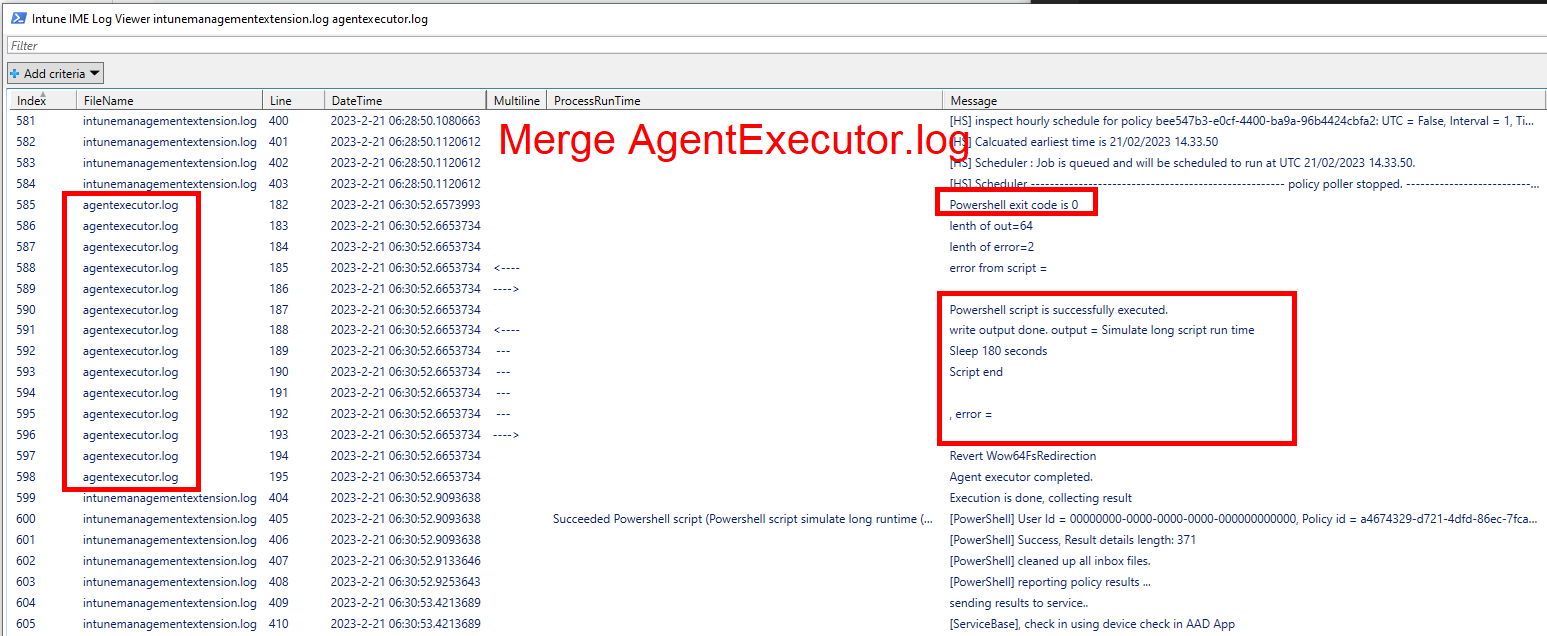
Script can merge multiple log files so especially in LogViewerUI you can see Powershell command outputs from AgentExecutor.log
Check [screenshots](https://github.com/petripaavola/Get-IntuneManagementExtensionDiagnostics/tree/main/pics)
Timeline report includes information about Intune events
* **Win32App**
* **WinGetApp**
* **Powershell scripts**
* **Proactive Remedation scripts**
* **custom Compliance Policy scripts**
Windows Autopilot ESP phases and other information is also shown on timeline.
### Usage: ###
**Download** script from PowershellGallery with command:
```
Save-Script Get-IntuneManagementExtensionDiagnostics -Path ./
```
**Run script**
```
./Get-IntuneManagementExtensionDiagnostics.ps1
# or to get Intune Powershell script names from Graph API
# use -Online parameter
./Get-IntuneManagementExtensionDiagnostics.ps1 -Online
```
**-Online** parameter will download Powershell script names from Graph API. Win32App and WinGetApp names are detected from Intune log files.
-Online parameter requires Intune Powershell management module **Microsoft.Graph.Intune** installation.
You can install Intune Powershell management module to your user account with command
```
Install-Module -Name Microsoft.Graph.Intune -Scope CurrentUser
```
**In Windows Autopilot Shift-F10 Command Prompt during Windows Autopilot Pre-Provisioning or Enrollment Status Page**
```
Powershell.exe
cd C:\ProgramData
Set-ExecutionPolicy bypass -Scope Process
Save-Script Get-IntuneManagementExtensionDiagnostics -Path ./
./Get-IntuneManagementExtensionDiagnostics.ps1
# -Online when you need to get displayNames to Powershell scripts
./Get-IntuneManagementExtensionDiagnostics.ps1 -Online
```
### Parameters ###
.\Get-IntuneManagementExtensionDiagnostics.ps1 -Online -AllLogEntries -AllLogFiles
**-AllLogEntries** **-AllLogFiles**
Open all supported log files (IntuneManagementExtension and AgentExecutor) and also show all log events
These options prevents showing UI which asks same information
```
.\Get-IntuneManagementExtensionDiagnostics.ps1 -Online -AllLogEntries -AllLogFiles
```
**-LogFile**
Open log file specifying fullpath to logfile
```
./Get-IntuneManagementExtensionDiagnostics.ps1 -LOGFile -LOGFile "C:\temp\MDMDiagReport\IntuneManagementExtension.log"
```
**-LogFilesFolder**
Open log files folder and show UI where you can select what Intune log files to open
```
./Get-IntuneManagementExtensionDiagnostics.ps1 -LogFilesFolder "C:\temp\MDMDiagReport"
```
**-ShowAllTimelineEntries**
Shows start events on Timeline.
```
./Get-IntuneManagementExtensionDiagnostics.ps1 -ShowAllTimelineEntries
```
Intune Powershell scripts' outputs and errors can be also shown in Timeline view with parameters
**-ShowStdOutInTimeline**
**-ShowErrorsInTimeline**
This shows instantly what is problem with failed Powershell scripts
There are many more Parameters but these should get you started.
### LogViewerUI - better than cmtrace.exe ?-) ###
Script also includes really capable Log Viewer UI when script is started with parameter **-ShowLogViewerUI**
```
./Get-IntuneManagementExtensionDiagnostics.ps1 -Online -ShowLogViewerUI -ConvertAllKnownGuidsToClearText
```
LogViewerUI (Out-GridView) looks a lot like cmtrace.exe tool but it is better because all found Timeline events are added to log for easier debugging.
LogViewerUI has good search and filtering capabilities. Try to filter known log entries in Timeline:
**Add criteria -> ProcessRunTime -> is not empty**
Selecting last line (RELOAD) and OK will reload log file.
Script can merge multiple log files so especially in LogViewerUI you can see Powershell command outputs from AgentExecutor.log
Check [screenshots](https://github.com/petripaavola/Get-IntuneManagementExtensionDiagnostics/tree/main/pics)
 ### Backlog: ###
There are many features in development and planned in future. Stay tuned :)
### Known issues: ###
* WinGetApp install may be detected falsepositive wrong. There is WinGet App install fail and empty App name and UserName in Timeline view.
* Status: Fixed in version 1.1
* Win32App Uninstall is shown as Install at least in Supercedende case
* Verified that intent is not gathered right in Win32App and WinGetApp install/uninstall
* Status: Fixed in version 1.1
### Backlog: ###
There are many features in development and planned in future. Stay tuned :)
### Known issues: ###
* WinGetApp install may be detected falsepositive wrong. There is WinGet App install fail and empty App name and UserName in Timeline view.
* Status: Fixed in version 1.1
* Win32App Uninstall is shown as Install at least in Supercedende case
* Verified that intent is not gathered right in Win32App and WinGetApp install/uninstall
* Status: Fixed in version 1.1